
Introduction: My First Experience With AI (And Why I Was Confused)
A few months ago, I noticed something strange.
Every conversation around work, productivity, and career started including one word — AI.
Friends were talking about it. LinkedIn was full of it. YouTube thumbnails made it feel like if I didn’t learn AI immediately, I would fall behind.
My first reaction wasn’t excitement.
It was confusion.
I didn’t know where to begin. When I searched for AI tools, I found hundreds of options. Tools for writing, meetings, coding, scheduling, and even things I didn’t fully understand. Instead of feeling curious, I felt overwhelmed.
Then there was the fear of complexity.
Most explanations sounded technical. Words like automation workflows, integrations, prompt engineering, and APIs kept appearing. It made AI feel like something built only for developers or tech experts. I kept wondering if learning programming was required just to use it.
But the biggest confusion was simpler.
I genuinely didn’t know where AI fit into my daily work. I saw impressive online demos, but they didn’t match my reality. I write emails. I plan tasks. I read documents. I attend meetings. None of that felt “advanced” enough to need AI.
My perspective changed when I stopped looking at AI as technology and started seeing it as a helper.
I realized AI isn’t here to replace skills. It quietly reduces repetitive mental work — rewriting emails, summarizing notes, organizing tasks, drafting responses, or structuring ideas.
Once I saw AI as a thinking assistant instead of a replacement, it started making sense.
This article is not about building complicated automation systems.
It is not about becoming an AI expert.
And it is definitely not about using ten different tools.
This is simply a starting system anyone can use in daily work.
The goal is clarity —
how to think about AI,
where to use it,
and how to let it quietly save time without changing how you work completely.

Understanding What AI Is (And What It Is Not)
AI as a Thinking Assistant, Not a Replacement
When I started experimenting with AI, I made the same mistake many beginners make.
I expected it to behave like an expert.
I assumed one question would produce a perfect final answer. Sometimes it worked. Most times, it didn’t. The responses were useful, but they needed correction or personalization.
That’s when I understood something important.
AI works best as a thinking assistant.
It helps draft content when you don’t know how to start.
It summarizes long information when you don’t have time to read everything.
It organizes scattered thoughts when your mind feels overloaded.
It suggests ideas when you feel stuck.
But it is not a decision-maker.
It cannot fully understand your responsibilities, relationships, or long-term goals. It can support thinking, but it cannot replace judgment or experience.
Once I accepted this, my expectations became realistic — and the results improved.
Why Most Beginners Struggle With AI
I kept noticing three common patterns.
First — expecting perfect answers.
AI usually produces strong first drafts, not final results. When beginners treat them as final, they either feel disappointed or use weak outputs.
Second — asking vague questions.
Typing “Write email reply” produces generic responses.
Typing “Write a polite reply asking for two extra days to finish a project” produces far better results.
Clarity in the question creates clarity in the answer.
Third — trying too many tools at once.
People often download multiple tools in one week. Instead of learning properly, they jump between platforms and remain confused. AI becomes useful only when it is used repeatedly for real work.
The 4 Work Areas Where AI Helps Most
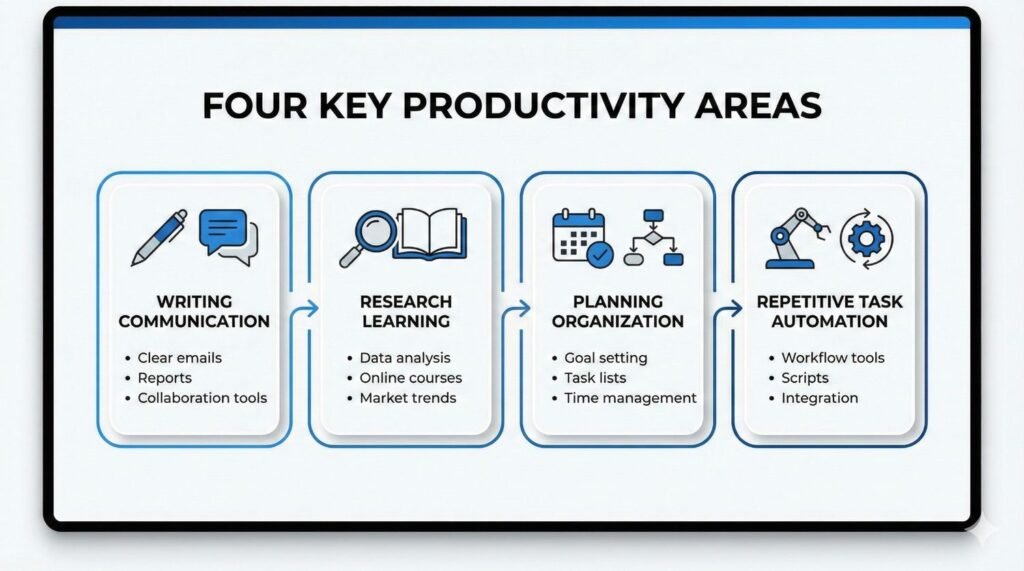
After using AI consistently, I noticed it helps in four major areas.
1. Writing & Communication
This is where most people see immediate benefits.
AI helps draft emails, improve tone, rewrite messages professionally, or simplify complex explanations.
Sometimes my emails sound too direct. I paste them into AI and ask it to soften the tone. Within seconds, I get a clearer and more balanced version.
It doesn’t remove my voice. It simply helps me express it better.
2. Research & Learning
Reading long documents can consume a lot of time. AI helps summarize information and highlight key points.
If I receive a long report or industry article, I ask for a summary in bullet points. It helps me quickly decide whether deeper reading is necessary.
It feels like getting quick notes before reading an entire chapter.
3. Planning & Organization
Often, the hardest part of work is not execution — it is deciding where to start.
AI helps break large work into smaller steps. It helps create structured to-do lists and daily plans.
If I need to prepare a presentation, I ask AI to outline preparation steps. Instead of staring at a blank screen, I get a starting structure.
This reduces decision fatigue more than expected.
4. Repetitive Task Automation
Some tasks are necessary but mentally draining — formatting content, rewriting emails, summarizing reports, or organizing notes.
AI handles these quickly.
For example, I paste multiple meeting notes and ask AI to convert them into action points. Instead of manually sorting information, I get structured results instantly.
When beginners understand these four areas, AI feels less confusing.
You stop asking, “What can AI do?”
And start asking, “Which part of my work feels repetitive?”
That small shift makes AI practical.
Step 1 — Identify Repetitive Tasks In Your Daily Work
Why Most People Start Wrong
When I tried using AI seriously, I started by searching for tools.
I watched tutorials, bookmarked apps, and tested multiple platforms. After a few days, I had tools but no clarity. I was learning features instead of solving problems.
AI becomes useful only when it solves something specific.
The turning point came when I stopped asking:
“Which tool should I learn?”
And started asking:
“Which part of my work feels repetitive and slow?”
My Simple Observation Exercise
You don’t need software for this step. Just observation.
For one working day, I paid attention to the tasks I performed. At the end of the day, I reviewed patterns.
I focused on:
- Tasks that repeat daily or weekly
- Tasks that require effort but little creativity
- Tasks involving rewriting, formatting, summarizing, or organizing
Once I identified these patterns, AI became far more relevant.
Beginner Examples Most People Already Do
Writing emails
Meeting summaries
Creating to-do lists
Researching topics
Drafting reports or documents
When I listed my tasks, I realized most of my time was spent on these activities.
Quick Self-Assessment Checklist
Ask yourself:
• Which tasks feel boring but necessary?
• Which tasks consume time but produce small output?
• Which tasks do I postpone frequently?
Once you identify repetitive work, AI becomes easier to apply.
You stop experimenting randomly and start solving real problems.
Step 2 — Start With One AI Tool Only
Why Beginners Should Avoid Tool Overload
After identifying tasks, I made another mistake — trying too many tools.
Every tool had a different interface and learning curve. Instead of saving time, I spent time learning software.
AI productivity is not about using many tools.
It is about using one tool comfortably.
When you focus on one platform, you learn how to ask better questions. Confidence builds naturally.
My Recommended Starting Approach
Start with one general AI assistant that helps with writing, summarizing, planning, and brainstorming.
The real skill is not tool selection.
The real skill is asking clearly.
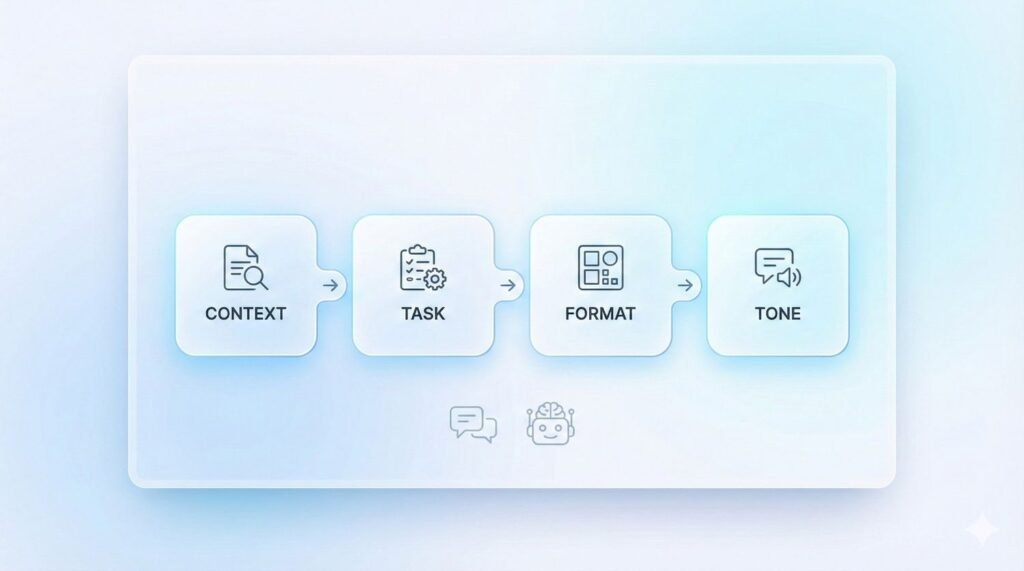
The Beginner Prompt Formula I Use
I follow a simple structure:
Context → Task → Format → Tone
Email Example
Context: Reply to a client asking for deadline extension
Task: Request two extra days
Format: Short and professional
Tone: Polite
Summary Example
Context: Meeting notes
Task: Summarize action points
Format: Bullet points
Tone: Clear and direct
Planning Example
Context: Preparing a presentation
Task: Break preparation into steps
Format: Checklist
Tone: Simple and practical
Common Beginner Mistakes
• One-line vague prompts
• Expecting final output without editing
• Not providing context
Once beginners learn how to ask clearly, AI starts feeling like a fast assistant rather than a complicated tool.
Step 3 — Use AI For Three Simple Daily Tasks First
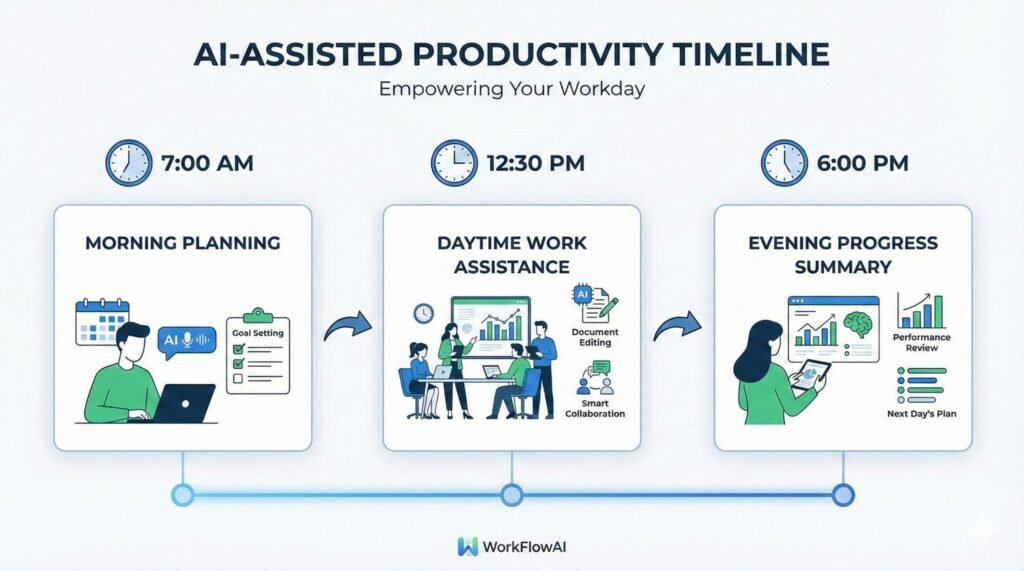
When I started using AI regularly, I noticed not every task needed it. Trying to use AI everywhere created frustration.
What worked best was focusing on three daily tasks.
Task 1: Writing & Rewriting Communication
Most professionals spend significant time writing emails, messages, and responses.
I often draft rough emails and use AI to improve clarity or adjust tone. It helps structure responses politely and professionally.
It doesn’t replace communication.
It removes rewriting stress.
Task 2: Summarizing Information
Reading reports, articles, and notes consumes hidden time.
Now I paste meeting notes or long documents into AI and ask for summaries or action points. It helps me understand information quickly and decide next steps faster.
This reduces mental fatigue and improves decision speed.
Task 3: Daily Planning & Task Organization
Many productivity struggles come from unclear planning.
AI helps break large projects into smaller tasks and organize daily schedules. Seeing structured steps reduces procrastination and makes work easier to begin.
Why These Three Tasks Give Fast Results
They exist in almost every profession.
They happen daily.
They follow predictable patterns.
That is why beginners see results quickly without technical setup.
Step 4 — Build A Small Daily AI Habit

At first, I used AI randomly. Some days I used it heavily. Other days, I ignored it.
Progress started when I turned AI into a small daily habit.
I created a simple 15-minute routine.
Morning: Plan Tasks Using AI
I list my tasks and ask AI to organize them by priority or break large tasks into smaller steps. It removes confusion before work begins.
During Work: Use AI For Drafting And Rewriting
I use AI mainly for communication and documentation. It helps structure and polish content, saving small amounts of time throughout the day.
End Of Day: Summarize Progress
I paste completed tasks or notes and ask AI to summarize outcomes. It helps me review progress and prepare for the next day.
Why Consistency Matters More Than Complexity
Improvement comes from regular use.
The more you use AI, the better you understand how to guide it. Comfort grows naturally. Over time, AI feels less like a shortcut and more like a support system.
Step 5 — Learn When NOT To Use AI

When AI becomes comfortable to use, another risk appears — using it everywhere.
Knowing when not to use AI is equally important.
Tasks That Still Need Human Judgment
Final Decision Making
AI can help analyze options, but final decisions require responsibility and experience.
Emotional Communication
Sensitive conversations require empathy. AI can polish language, but the message must come from you.
Complex Strategy Thinking
AI helps brainstorming, but long-term planning requires human judgment.
Importance Of Reviewing AI Output
Fact-Checking
AI can sound confident even when incorrect. Verifying information prevents mistakes.
Personalizing Tone
AI responses can feel generic. Small personal edits improve authenticity.
Adding Context
AI works only with provided information. Reviewing ensures relevance to real situations.
Over time, I learned to treat AI like a fast assistant that still needs supervision.
Conclusion: AI Is Less About Technology And More About Thinking Better
Looking back, AI did reduce my workload — but it increased responsibility.
When work becomes faster, thinking quality becomes more important. AI drafts and organizes quickly, but results still depend on instructions, review, and decisions.
If someone is starting with AI, the simplest advice is:
Start small.
Use it for daily tasks.
Experiment regularly.
AI mastery grows gradually through usage, not technical complexity.
Final Take
AI is most useful when it solves small, practical problems instead of trying to transform everything at once.
It reduces repetitive work like communication, summaries, and planning. These small improvements create mental space for deeper thinking and better decisions.
AI does not remove responsibility. It still requires clear instructions and thoughtful review.
The simplest path forward is to notice repetitive work, use one tool consistently, and learn through daily use.
Treat AI as support — not replacement.
That balance is where it becomes genuinely useful.